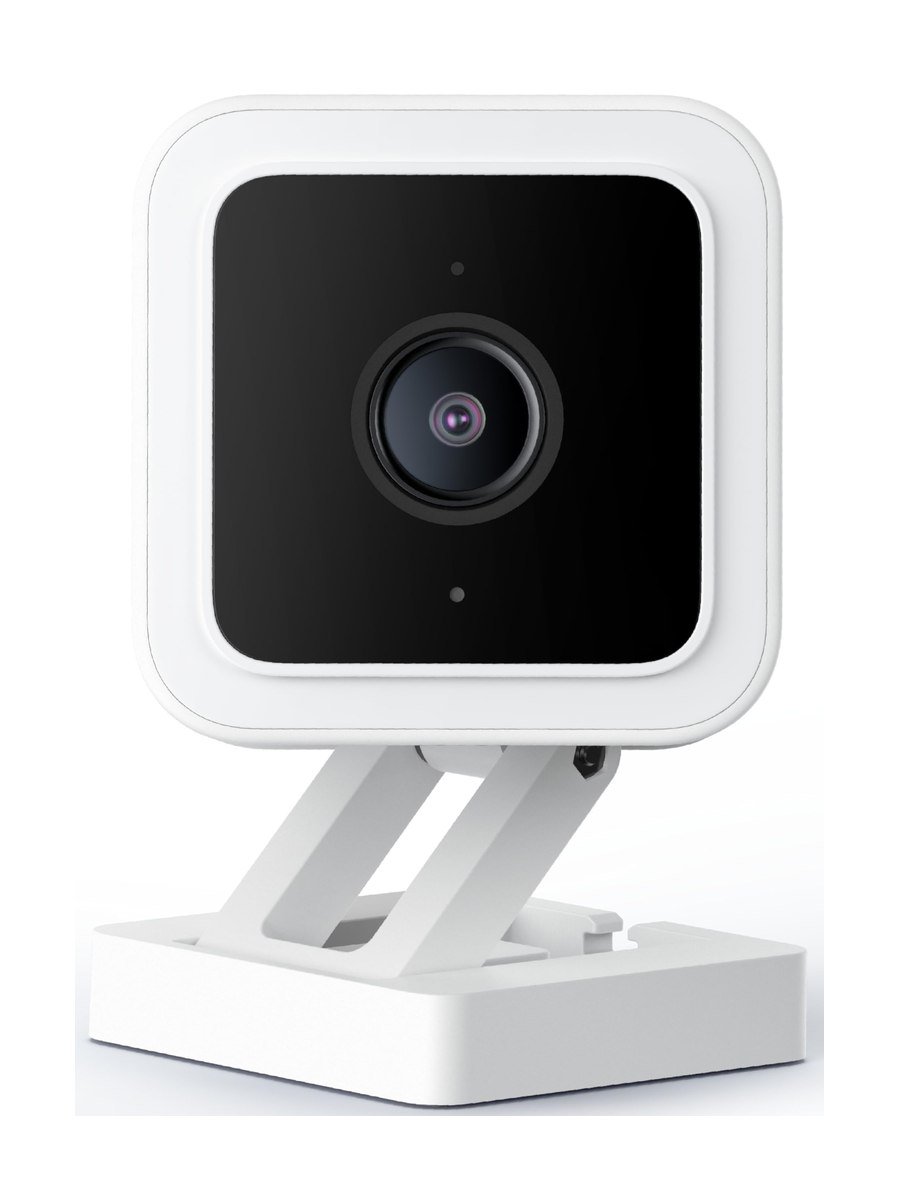
The Wyze Cam v3 is the camera that makes you check the price twice. It undercuts almost everything with a brand on it, and the two features it leads on — colour night vision and free local recording — are the two most cameras charge extra for.
Colour night vision
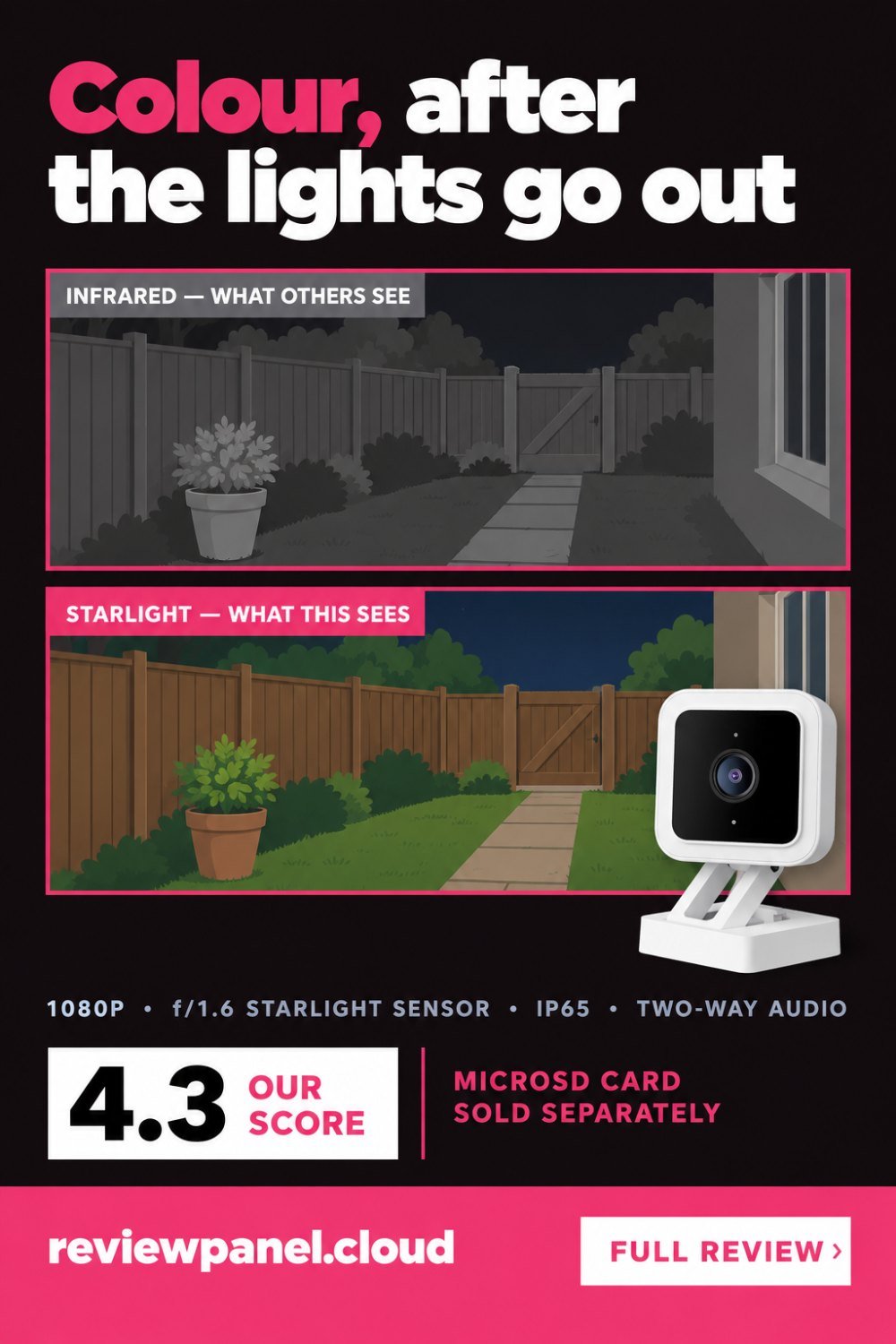
Most cameras switch to infrared after dark and give you a grey image. The v3 uses a Starlight sensor with an f/1.6 aperture that gathers roughly twice the light of the older model, and Wyze claims it can see in full colour in conditions up to twenty-five times darker than a conventional camera. In practice, with any street lighting or a porch light, you get usable colour footage where other cameras give you monochrome. Colour matters when you are trying to describe a jacket or a car to someone.
There is a limit worth knowing. Colour needs some light, however little. In a windowless room with the lights off, or a garden with no street lamp and no moon, the camera falls back to infrared like everything else. If colour at night is the reason you are buying, a porch light on a dusk sensor does more for the footage than any upgrade to the camera.
Indoor or outdoor
IP65 means it handles rain and dust, so it can live under an eave or on a wall. Outdoors it needs the Wyze Outdoor Power Adapter, sold separately, because the standard cable is not weather-rated. Plan for that in the budget. Indoors it is tiny and the magnetic base makes placement easy.
Two mounting details decide the footage more than the specification does. Point it across a path rather than straight down it: someone walking towards a lens crosses very few pixels a second, and motion detection is built on change between frames. And keep it out of direct sun and away from glass. A camera behind a window photographs its own infrared reflection at night, which is why so many indoor cameras produce a white haze after dark.
Recording without a subscription
This is the part that matters. Drop in a microSD card and the camera records continuously, or on motion, straight to the card at no monthly cost. Cloud clips and AI detection are a paid add-on, but the basics — footage you can scroll back through — are free. Very few competitors do this.
Use a card built for it. Continuous recording overwrites the same card day after day, which is exactly the workload that kills ordinary photo cards; the ones sold for dash cams and surveillance are designed for it and cost very little more. A card that has failed usually announces itself by the camera quietly having no footage on the day you need it, so check the playback timeline once a month rather than assuming.
Cutting the false alerts
Motion alerts on the free tier trigger on shadows, rain, headlights and moths, and the usual result is that people switch notifications off after a week. Three settings fix most of it. Set a detection zone that excludes the road, the sky and any tree, because those three produce the overwhelming majority of useless clips. Raise the motion sensitivity threshold rather than lowering it, since the default is generous. And if the camera faces a busy street, accept that person detection is what actually solves the problem, and that it is the paid feature.
What you give up
It is 1080p, not 2K, and the difference shows when you try to read a number plate. The app is functional rather than polished, and motion alerts without the paid AI tier trigger on shadows, rain and headlights. Wyze has also had security incidents in its past, which is worth weighing when you decide which rooms a camera goes in.
That last point deserves a plain answer rather than a shrug. If a camera is going in a bedroom, a bathroom or a child's room, the brand's security history should carry more weight than the price, whichever brand you pick. A camera on a driveway, a hallway or a garage is a different risk. It is a reasonable position to buy four of these for the outside of a house and none for the inside.
Should you buy it?
Buy the v3 if you want several cameras without several subscriptions, and colour night footage matters more to you than resolution. Skip it if you need 2K detail, a polished app, or a vendor with an unblemished security record.
Key features
Starlight sensor
f/1.6 aperture gathering about twice the light of the previous model.
Colour night vision
Full-colour footage in conditions well below what infrared cameras need.
IP65 weatherproofing
Rain and dust resistant for use under an eave or on a wall.
24/7 local recording
Continuous or motion recording to a microSD card at no monthly cost.
Two-way audio
Speak to whoever is in front of the camera through the app.
Assistant support
Works with Alexa, Google Assistant and IFTTT.
Pros & cons
What we like
- Colour night vision instead of grey infrared
- Records to microSD with no monthly fee
- IP65 rated for outdoor use
- Two-way audio and motion and sound alerts
- Works with Alexa, Google Assistant and IFTTT
- Cheap enough to buy several
What could be better
- 1080p is limiting for faces and number plates
- Outdoor use needs a separate weatherproof adapter
- Free motion alerts trigger on shadows and rain
Specifications
Frequently asked questions
No. With a microSD card it records locally for free, including 24/7 continuous recording. Cloud clips and AI person detection are paid extras.
Yes, it is IP65 rated. The supplied indoor cable is not weatherproof, so outdoor use needs the Wyze Outdoor Power Adapter.
Wyze quotes up to 25 times darker than a conventional camera. In practice any street or porch light is enough for usable colour.
Up to 32 GB is officially supported. Use a card rated for continuous recording rather than a standard photo card.
Not natively. It supports Alexa, Google Assistant and IFTTT.
The camera is behind glass and photographing its own infrared reflection. Move it outside the window, or switch the infrared lights off and rely on a porch light for colour.
Set a detection zone that excludes the road, the sky and any tree, and raise the sensitivity threshold rather than lowering it. On a busy street, person detection is what genuinely fixes it and that is a paid feature.
One sold for dash cams or surveillance rather than a standard photo card. Continuous recording overwrites the same card constantly, which is the workload that wears ordinary cards out. Check the playback timeline monthly.
Final verdict
Colour night vision and free local recording at a price that makes buying four of them reasonable. The app and the 1080p sensor are where the money was saved.
What owners report
Gathered from what long-term owners consistently say, not from a single test.
Nothing records without a memory card, and people who do not account for that make a second purchase after opening the box. Notifications arriving late without a subscription is the limit most often raised by those buying it for security. Colour night vision is repeatedly named as the feature that surprises anyone who knows the price. Outdoors the body holds up, but the connector on the power cable becomes the weak point if it is left unprotected.
Reader rating
Found this review helpful?
Pin it to one of your boards and come back to it whenever you need a reminder.

No comments yet.
Join the discussion. Comments are moderated before appearing.