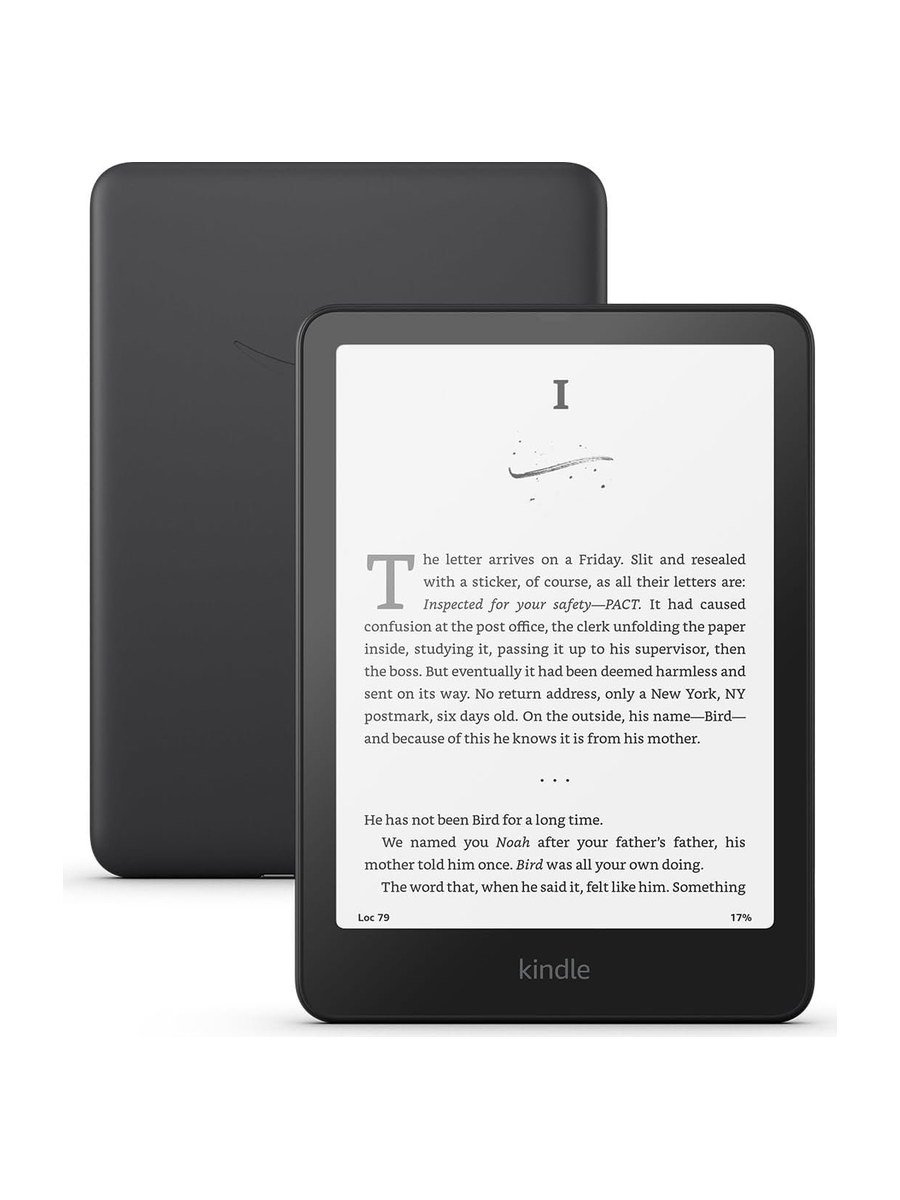
The Paperwhite has been the default Kindle recommendation for years, and the 2024 model is the first one in a while where the upgrade is obvious the moment you pick it up. The screen is bigger, the page turns are quick, and the battery still asks for almost nothing.
The screen
The display grows to 7 inches while keeping 300 pixels per inch, so text stays as crisp as print at any size you choose. Amazon also raised the contrast, and the difference is easiest to see in thin fonts and in the grey areas of book covers. It is glare-free, which is the part phone readers underestimate: direct sun on a beach or through a train window simply does not wash it out.
The warm light slides from white to amber. Set it to switch automatically at sunset and reading in bed stops feeling like staring at a screen.
Speed is the real upgrade
Amazon quotes page turns about 25 per cent faster than the previous Paperwhite, and in everyday reading that translates into something simpler: you stop noticing the page turn at all. Opening books, jumping to the library and searching all feel closer to a tablet than to the sluggish e-readers of a few years ago.
Battery and charging
The rating is up to 12 weeks on a charge, based on about half an hour of reading a day with wireless turned off. Real use with Wi-Fi on and brighter light will be shorter, but charging stays a monthly event rather than a nightly one. It charges over USB-C, so the cable you already use for your phone works.
Which Kindle to buy
| If you want | Buy |
|---|---|
| The best reading experience for most people | Kindle Paperwhite |
| Auto-brightness and wireless charging | Paperwhite Signature Edition |
| Colour covers and comics | Kindle Colorsoft |
| The smallest, lightest, cheapest option | Basic Kindle |
Living with it
Because it is waterproof, the Paperwhite goes where a paperback would be at risk: the bath, the pool, the kitchen counter. There are no apps, no social feeds and no notifications, which is the point. Many readers find they read more simply because the device cannot do anything else.
US readers can borrow from public libraries through Libby and send books straight to the Kindle, and Kindle Unlimited is available as an optional subscription. If most of your library comes from other stores, check how you will get those books onto the device before you commit.
Looking after it
A simple cover protects the screen in a bag and adds wake and sleep when you open it. Keep the software updated over Wi-Fi, since Amazon regularly adds reading features. If the screen ever looks ghosted, a restart clears it.
Setting it up well
Three settings make the biggest difference in the first week. Turn on the warm light schedule so the screen shifts to amber in the evening. Pick a font and size once, then save it as a theme so every book opens the same way. And switch on page refresh if you read a lot of illustrated books, which clears the faint ghosting e-ink can leave behind.
If you read in bed, lower the brightness further than you would expect; the front light is designed to be comfortable at low levels. For travel, download books over Wi-Fi before you leave, then keep airplane mode on to stretch the battery even further.
Who it is not for
People who read mainly comics, cookbooks or magazines will miss colour, and the Colorsoft is built for that. Anyone who wants to annotate by hand with a pen should look at the Kindle Scribe. And if you only read a handful of books a year on holiday, the basic Kindle covers the essentials for less.
Should you buy it?
Buy the Paperwhite if you read more than a few books a year and want a device that disappears in your hands. Skip it for the Signature Edition only if wireless charging and auto-brightness matter to you, and look at the Colorsoft if you read comics or cookbooks. For almost everyone else, this is the Kindle.
Key features
Faster display
Higher contrast and page turns about 25% faster than the previous Paperwhite.
7-inch glare-free screen
Larger than before at 300 ppi, readable in direct sun.
Adjustable warm light
Shift the front light from white to amber for reading in the dark.
Waterproof
Built to survive the bath, the pool and a spill.
Weeks of battery
A single USB-C charge lasts up to 12 weeks of typical reading.
Distraction-free
No social media or notifications, just books.
Pros & cons
What we like
- Page turns are quick enough to forget about
- Larger 7-inch screen with no loss of sharpness
- Warm light from white to amber for night reading
- Waterproof for the bath and the pool
- Charge lasts for weeks over USB-C
- No apps or notifications pulling you away
What could be better
- No automatic brightness on the standard model
- Wireless charging needs the Signature Edition
- Books from other stores need a workaround
Specifications
Frequently asked questions
For most readers, yes. The larger screen, waterproofing and warm light make a daily difference; the basic Kindle is smaller and has no warm light.
Yes. It is built to handle the bath, the pool and accidental spills.
Amazon rates up to 12 weeks on a single charge based on typical reading of about half an hour a day with wireless off.
More storage, an auto-adjusting front light and wireless charging. The reading experience itself is the same.
In the US, many public libraries lend Kindle books through Libby, which sends them straight to your Kindle.
It can be bought with or without lock-screen offers. The version without offers costs a little more.
Final verdict
The fastest and brightest Paperwhite yet, with a 7-inch screen that finally feels roomy. Unless you need colour or a pen, this is the Kindle to get.
What owners report
Gathered from what long-term owners consistently say, not from a single test.
Battery life is the thing owners mention first, with charging described as something that happens rarely rather than weekly. The size is widely called the right balance between a roomy page and a device light enough to hold one-handed in bed. Speed comes up often from people moving from older Kindles. A minority of buyers are unhappy with how the Kindle ecosystem handles books bought outside Amazon, so check that before moving a large library.
Reader rating
Found this review helpful?
Pin it to one of your boards and come back to it whenever you need a reminder.

No comments yet.
Join the discussion. Comments are moderated before appearing.