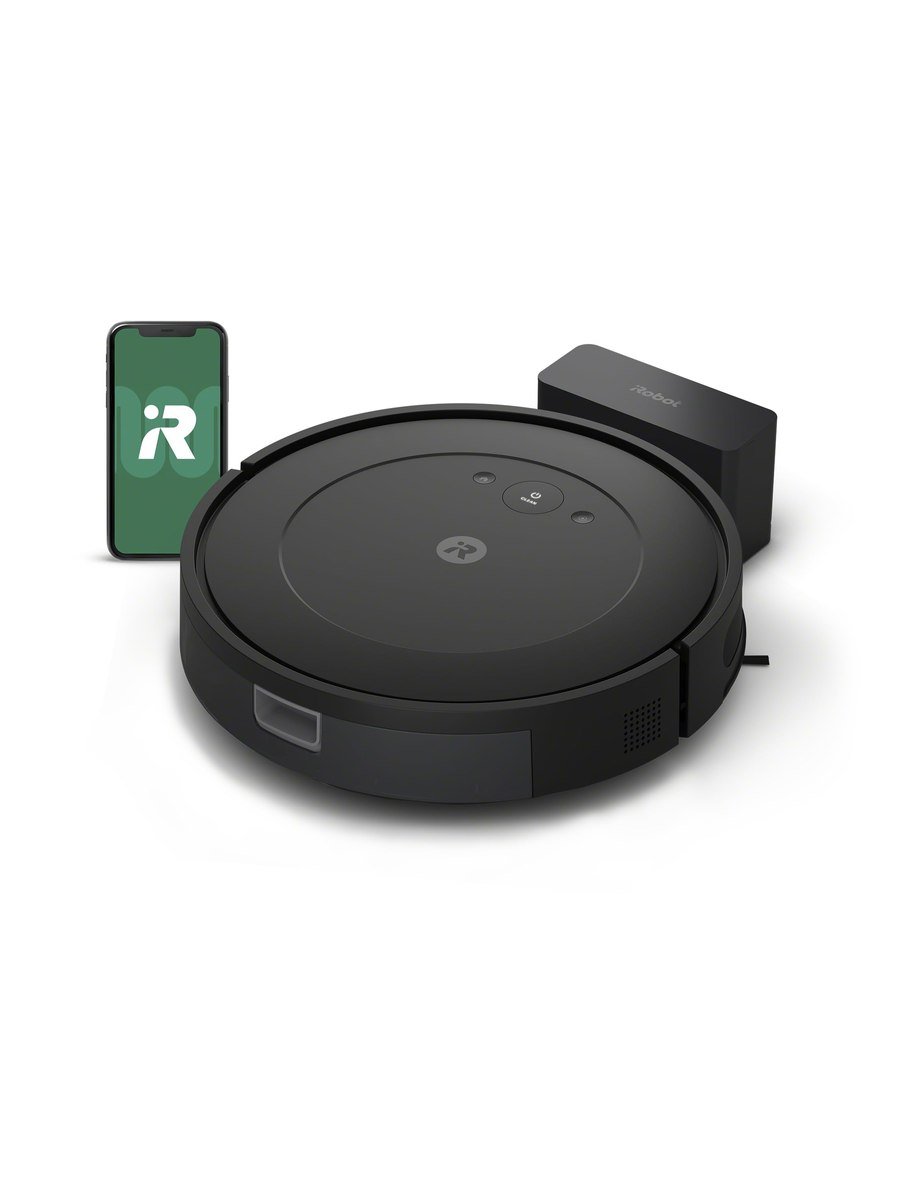
Robot vacuums split into two groups: the ones that build a map of your home and the ones that just clean. This is the second kind, and for a lot of households it is the more sensible purchase.
How it cleans
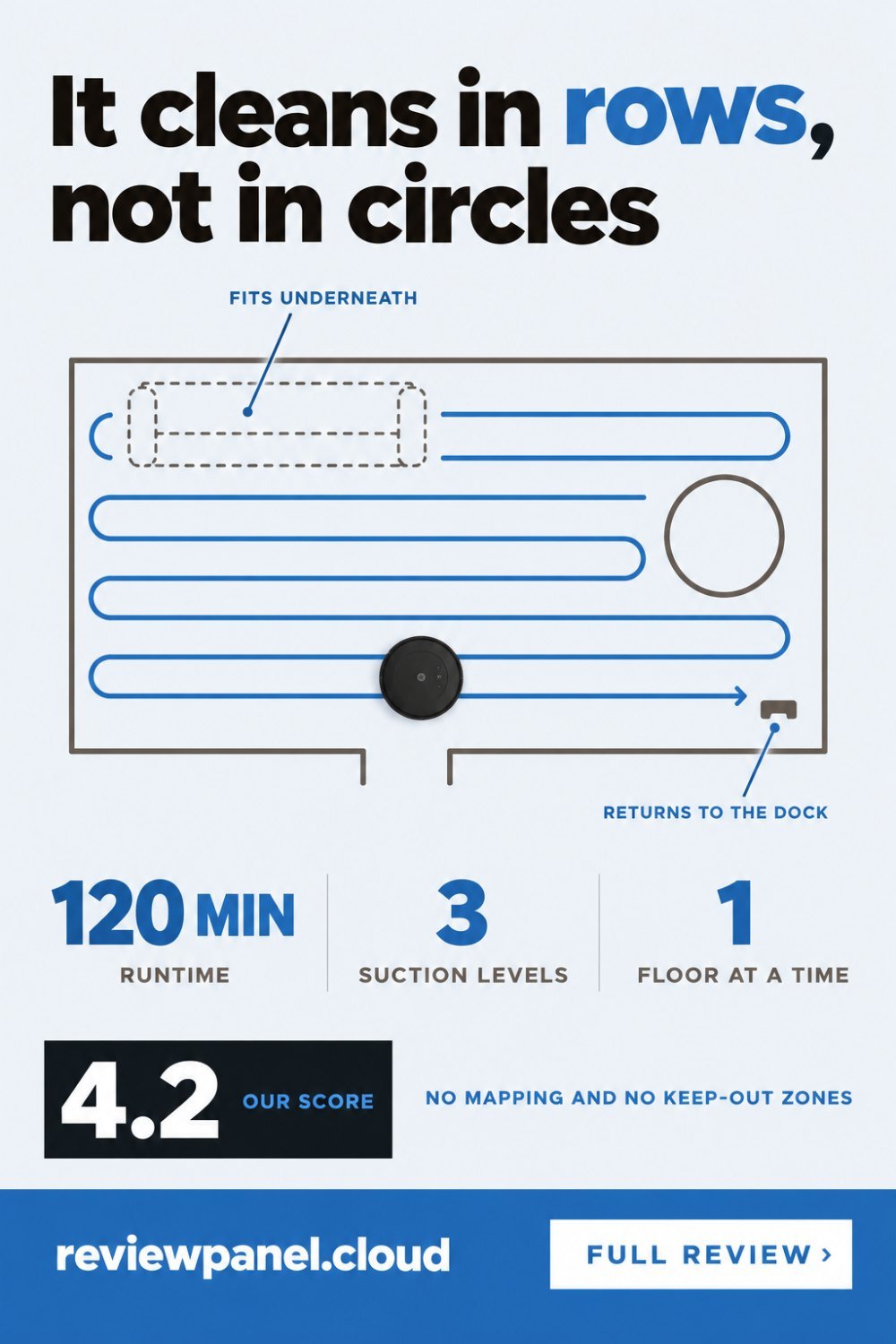
Older cheap robots bounced around randomly and hoped for the best. This one navigates in methodical rows, which means it covers a room properly and finishes in a predictable time rather than wandering for an hour. Sensors keep it off stairs and away from furniture legs. The three-stage cleaning system has three suction levels, so you can push it harder on carpet and keep it quiet on hard floors.
An edge-sweeping brush pulls debris out of corners and along skirting boards, which is where robots traditionally fail. It is not perfect — no round robot gets a square corner completely — but it is much better than nothing.
The low body
The thing that decides whether a robot vacuum earns its keep is whether it fits under your furniture. This one is deliberately low-profile and slides under most sofas and bed frames. That is the space you never vacuum yourself, and it is where the dust actually lives.
Preparing a room so it works
A robot without a map has no memory of yesterday's obstacle, so the house has to be set up once rather than tidied every time. Five minutes of preparation is the difference between a machine that runs daily for years and one that lives in a cupboard.
Cables are the main killer: a phone charger on the floor stops the run and sometimes damages the brush. Clip them up or run them behind furniture permanently. Long tassels on rugs wrap the brushroll, so fold them under or move the rug. Dark, high-contrast floor mats can read as a drop to the cliff sensors, which makes the robot refuse to cross them. Pet bowls get pushed and spilled, so lift them or box them in. And if a room has something the robot must not touch, this model has no keep-out zones, so the answer is a physical barrier: a closed door, a box, or a chair leg placed deliberately.
Runtime and the app
Up to 120 minutes on a charge, then it returns to the dock on its own. For a flat or a floor of a house that is a complete clean without intervention. The iRobot Home app handles schedules, a Clean While I'm Away routine, and a Clean Map report showing where it went. Voice control works through Alexa and Google.
Schedule it for when the house is empty rather than overnight. It is not loud, but it is loud enough to wake someone, and a robot that runs while you are out is a robot nobody has to think about. The dock wants a clear stretch of wall with space either side; tucked into a corner, it struggles to find its way home and finishes stranded in the middle of the floor.
Upkeep, and what it costs
| Part | How often | Why |
|---|---|---|
| Bin | Every run or two | Small bin; a full one stops picking up |
| Filter | Tap out weekly, replace every few months | Clogged filter costs suction quietly |
| Side brush | Check monthly, replace when bent | Bent bristles stop reaching the skirting |
| Brushroll and ends | Monthly, more with long hair | Wrapped hair stalls the motor |
| Cliff sensors and wheels | Wipe monthly | Dusty sensors cause random refusals to cross floors |
None of that is onerous, but all of it is real, and a robot vacuum that is never maintained turns into a machine that pushes dust around. Budget a small amount each year for brushes and filters the way you would for any vacuum.
What you give up
No lidar mapping, so you cannot say "clean the kitchen" and have it go there. No keep-out zones drawn on a map. No self-emptying dock on this model — you empty the bin yourself, and on a shedding-pet floor that is every run or two. And like every robot, it needs the floor picked up first; cables and socks end it quickly.
Mapping is worth paying for in two situations: a house with several distinct rooms you want cleaned separately, and a home where something on the floor genuinely cannot be moved. If you have one open level and can pick up cables, the map adds convenience rather than cleanliness.
Should you buy it?
Buy it if you want floors kept tidy between proper cleans, your home is mostly one level, and you will spend thirty seconds clearing the floor before it runs. Skip it if you want room-by-room commands, keep-out zones, or a dock that empties itself. Our robot vacuum guide works through those four questions before you spend anything.
Key features
Row-by-row navigation
Methodical coverage with a predictable finish time.
3-stage cleaning system
Three suction levels for different floor types.
120-minute runtime
Returns to the dock automatically when the battery is low.
Edge-sweeping brush
Pulls debris out of corners and along skirting boards.
Cliff sensors
Keeps it away from stairs and drops.
iRobot Home app
Schedules, Clean While I'm Away, and a Clean Map report.
Pros & cons
What we like
- Navigates in neat rows instead of at random
- Up to 120 minutes of runtime, then self-docks
- Three suction levels for carpet and hard floors
- Low profile gets under furniture
- Edge-sweeping brush for corners and skirting
- App scheduling and voice control
What could be better
- No mapping, so no room-by-room commands
- No keep-out zones
- Bin is small and you empty it yourself
Specifications
Frequently asked questions
No. It cleans in rows using sensors rather than building a map, so you cannot send it to a specific room or set keep-out zones.
Up to 120 minutes, after which it returns to the dock to recharge. That covers a flat or one floor of a house in a single pass.
It is deliberately low-profile and fits under most sofas and bed frames. Measure the clearance if yours sits unusually low.
Not on this model. You empty the bin by hand. The Roomba Vac 2 Essential with AutoEmpty dock does that instead.
It picks it up well, but the bin is small, so on a shedding floor expect to empty it after every run.
Clip cables up permanently, fold rug tassels under, lift pet bowls and close doors to rooms it should not enter. With no keep-out zones on this model, a physical barrier is the only zone you get.
Cliff sensors read a dark, high-contrast surface as a drop. Wiping the sensors helps; if the rug still stops it, that rug and this robot will not get along.
Empty the bin every run or two, tap the filter out weekly and replace it every few months, cut hair off the brushroll monthly, and wipe the cliff sensors and wheels. Skipping it is why robots quietly stop picking anything up.
Final verdict
Cleans in methodical rows rather than bouncing around, runs for two hours and fits under the sofa. No mapping, no keep-out zones, no self-emptying.
What owners report
Gathered from what long-term owners consistently say, not from a single test.
Without mapping it does not cover rooms evenly; closing doors and running one room at a time is the workaround owners converge on. Cables and rug fringes are the most common thing it gets caught on, so clearing the floor first becomes part of the routine. The bin is small, and in homes with pets it needs emptying after every run. Genuinely taking over daily floor upkeep on hard surfaces is the praise that repeats most.
Reader rating
Found this review helpful?
Pin it to one of your boards and come back to it whenever you need a reminder.


No comments yet.
Join the discussion. Comments are moderated before appearing.